


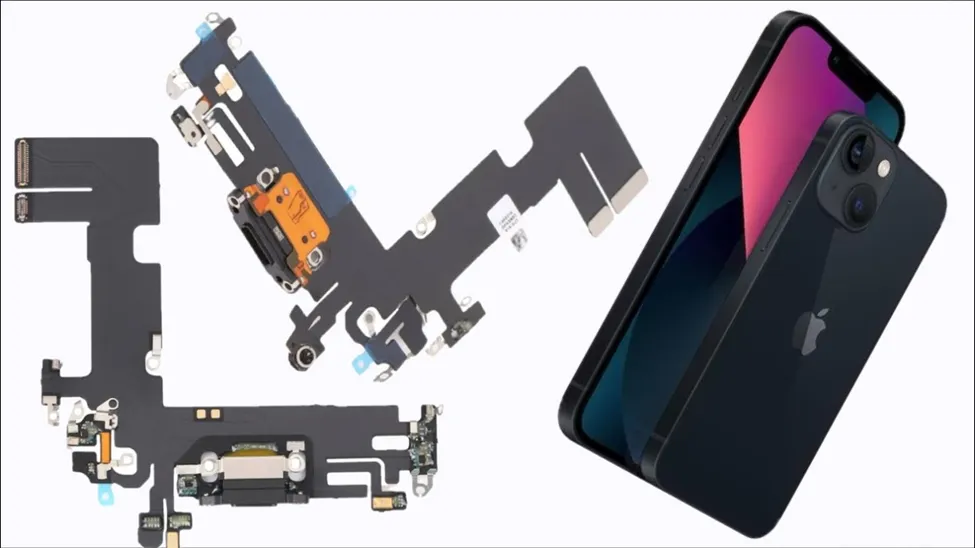
Charging issues can be frustrating, especially when a phone fails to charge consistently, disconnects unexpectedly, or responds only when the cable is positioned in a particular way. While some charging problems may result from accessories or software, physical port issues can also affect reliable charging.
Before considering iPhone Charging Port Replacement, users should identify the actual cause of the problem. Dust, lint, moisture, worn connectors, damaged charging pins, faulty cables, and internal component issues can all contribute to charging difficulties. Understanding the symptoms can help users avoid unnecessary repairs and determine whether cleaning, accessory replacement, or professional inspection may be appropriate. When the charging port itself is damaged, a suitable repair can restore charging functionality and help maintain the phone’s everyday usability.
Common Signs of Charging Port Problems
Recognizing early symptoms can help users address charging issues before they become more disruptive or affect other components.
1. Intermittent Charging
A phone that repeatedly starts and stops charging may have an issue with the charging cable, adapter, software, or port. If multiple compatible cables produce the same result, the port may require closer inspection. Loose internal connections, accumulated debris, or worn contact points can prevent stable electrical contact. Avoid repeatedly forcing the connector into position, as excessive pressure can worsen physical damage. A professional assessment can help determine whether the problem requires simple cleaning, accessory replacement, or a more involved repair.
2. Charging Only at Certain Angles
When a phone charges only when the cable is held at a particular angle, the port may have accumulated debris or experienced physical wear. Although users may be tempted to keep charging in this position, repeated movement can put extra stress on the connector. Also check the cable, as damaged or worn cables can cause similar symptoms. If the issue remains after testing suitable accessories, professional inspection can help determine whether the port has been damaged.
3. Slow or Inconsistent Charging
Charging that takes significantly longer than expected can have several causes. An unsuitable adapter, damaged cable, background activity, battery condition, software issues, or port-related problems may all affect charging performance. Users should first test compatible charging accessories and check whether the issue occurs consistently. If charging remains unusually slow despite suitable accessories and normal usage conditions, the charging port and related components may require inspection. Identifying the cause is important before replacing any hardware.
4. Cable Fails to Stay Connected
A charging cable that frequently disconnects can indicate a loose connection or debris inside the port. Pocket lint and dust can gradually accumulate and prevent the connector from sitting correctly. Users should avoid inserting sharp objects into the port because this can damage delicate components. If careful external cleaning does not resolve the issue, professional inspection may be appropriate. A technician can examine the port and determine whether the connector, internal contacts, or another component requires attention.
5. No Charging Response
A phone that shows no charging response should not automatically be assumed to have a damaged charging port. The adapter, cable, power source, battery, software, and internal charging components should also be considered. Testing another compatible charger and power outlet can help narrow down the cause. If the device remains unresponsive, professional diagnostics can identify whether the port is responsible. Accurate diagnosis can prevent unnecessary component replacement and ensure that the actual fault is addressed.
Understanding Port Repair and Replacement
A charging port is a small but important component that enables power delivery and, depending on the device, data connectivity. Damage to the port can interfere with everyday phone use and may become progressively inconvenient.
Before proceeding with iPhone Charging Port Replacement, technicians should assess the port, charging accessories, battery condition, and related components. This helps distinguish physical port damage from problems caused by cables, adapters, software, or internal circuitry.
The repair process may vary according to the specific iPhone model and the nature of the damage. Proper tools and careful handling matter because charging components connect to other internal parts. Professional repair can help reduce the risk of additional damage and restore dependable charging performance.
Factors to Consider Before Port Repair
Choosing the appropriate repair approach involves more than identifying a charging problem. Review several practical factors before work begins.
● Device Model: Different iPhone models can use different internal designs and components, so repair procedures may vary.
● Nature of Damage: Debris, worn contacts, physical damage, moisture exposure, or internal faults may require different solutions.
● Accessory Testing: Testing compatible cables and adapters can help determine whether the port is actually responsible.
● Battery Condition: Battery health can influence charging performance and should be considered during diagnosis.
● Repair Quality: Proper tools, compatible components, and careful handling can support reliable repair outcomes.
● Data Protection: Users should maintain suitable backups and follow recommended precautions before handing over a device for repair.
Preventing Future Charging Port Problems
Good charging habits can help reduce unnecessary stress on the port and accessories. Users should insert and remove charging cables carefully rather than applying excessive force. Keeping phones away from moisture can also reduce the possibility of corrosion or liquid-related damage.
Pocket lint and dust can accumulate around charging ports, particularly when phones are frequently carried without protective storage. Users should avoid aggressive cleaning methods or sharp objects that may damage internal contacts. If debris becomes difficult to remove safely, professional cleaning may be preferable.
Using compatible and reliable charging accessories can also help support consistent performance. Replace damaged cables rather than reusing them repeatedly. These simple habits can help preserve the charging connection and reduce avoidable port-related problems.
Conclusion
Charging problems can result from damaged ports, worn cables, debris, battery issues, software conditions, or internal charging components. Understanding the symptoms and getting an accurate diagnosis can help users choose the right solution instead of replacing components unnecessarily.
For users seeking iPhone Repair in Dubai, 800Fixing provides repair services for different device-related requirements. Their services can support customers experiencing charging difficulties and other smartphone concerns. A professional assessment can determine whether a charging port needs cleaning, repair, or replacement based on the device’s condition. When selecting a repair provider, consider repair quality, compatible components, service terms, and proper handling. Addressing charging issues promptly can help restore dependable device performance and reduce the risk of further complications.